
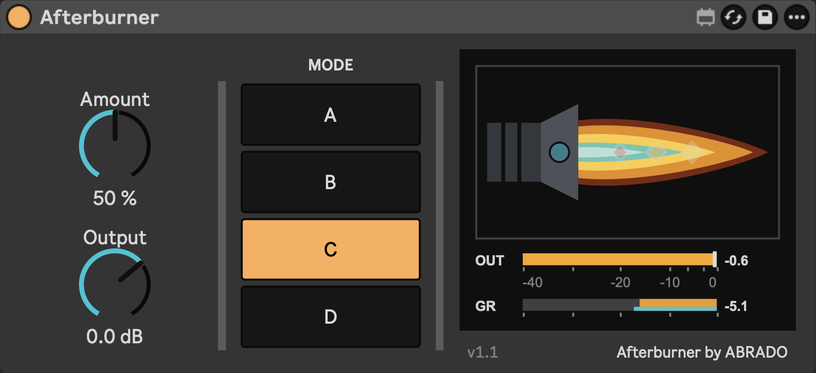
Afterburner v1.1 · Ableton Live 12
Afterburner
$5
One knob, four modes, measured against the original. A Max for Live audio effect for Ableton Live 12.
ABRADO 001 v1.1, first pressing, released 26 October 2026. One licence for your own machines, works offline after the first check. All sales final.
Hear it live
Toggle while it plays to hear the burn.
What is it doing?
One knob that squeezes, fattens and brightens the whole track, then keeps it from clipping.
Inspired by FL Studio's Soundgoodizer.
The numbers are further down.
Turn it up. That is the manual.
Amount, from 0 to 100. Mode, A to D. Output. Nothing else, because nothing else was needed.
Inspired by the one-knob maximizer that FL Studio producers put on 808s and vocals. Ableton has no equivalent; you would stack Multiband Dynamics, Saturator and Glue to get near it. Afterburner is that chain in one knob, fitted to measurements of the original rather than guessed.
At 0 % it is a bit-exact bypass. Turn it up and a 29 Hz high-pass, a three-band split (modes A to C; D is full band) and a compressor per band do the work; A and B end in a clipper, C and D in a clean limiter.
The controls
One knob when one knob is enough. A control that does not change the sound you reach for is a control you do not get.
- Amount
0 to 100 %
How much of the effect. 0 % is a bit-exact bypass.- Mode
A, B, C, D
Four tunings of the same chain. Switching is click-free, so you can automate it.- Output
−24 to +12 dB
Trim after the effect, for level-matching.
Four modes.
Afterburner splits the take into three bands and compresses each on its own (mode D works on the whole signal at once).
The sum is then held against a ceiling: a clipper in modes A and B, a limiter in C and D; mode B also runs its low band through a saturator.
Louder, denser and brighter is the job, not a side effect.
- A
- The smile. Low and high up, mids back, a clipper at the end. Drums.
- B
- Mid-forward, flat-topped. The dirty one.
- C
- Flat and loud, clean limiter, grit on sustained sounds. The vocal mode.
- D
- Full band, no split. Same tone, denser.
Three figures
- 172renders of the original measured
- −31.9 dBnull depth against the original (vocals, mode D)
- 177samples of latency, reported to Live (3.7 ms at 48 kHz)
Measured, not guessed.
172 renders of ten test signals went through the original. Afterburner was fitted to those renders until the two nulled against each other. These are the numbers from the release check on 19 October 2026.
| What | Result | Meaning |
|---|---|---|
| Drum loop, all modes, 25 to 100 % | −20 to −26 dB | Null against the original. 5 to 10 % of the signal is left when one is flipped in polarity against the other. |
| Vocals, all modes | −19 to −32 dB | Mode A at 100 % is the least exact (−19.2 dB). Mode D is the most (−31.9 dB). |
| Loudness error, drums and vocals | within 0.4 LU | Integrated loudness per render, Afterburner against the original. |
| Latency | 177 samples | 3.7 ms at 48 kHz, reported to Live so it is compensated. |
| CPU, one instance, Apple M4 Pro | 3 to 4 % | Max DSP meter, drums playing. Windows and Intel Macs: unmeasured. |
We would have liked −40 dB. The residual is the timing of the gain movement in the first milliseconds of a transient, not tone or loudness. Dense signals like pink noise are further off (−11 to −16 dB).
Install
- 01
- Unzip. Drag Afterburner.amxd into your Ableton User Library, under Presets › Audio Effects › Max Audio Effect.
- 02
- Drop it on a track. Audio passes immediately.
- 03
- Paste the licence key from your receipt email once. It is checked online once and remembered.
Requirements
- Format
- Max for Live audio effect (.amxd)
- Live
- 12 Suite, or 12 Standard with Max for Live
- Live 11
- not supported
- macOS
- tested
- Windows
- loads from standard Max objects; activation untested
- File
- Afterburner_v1.1.zip · 25 KB
- Licence
- one key from the receipt, checked online once, then remembered
Questions about Afterburner
Is there a dry/wet?
No. The knob already is one. At 0 % the output is bit-identical to the input.
Is there a preset browser?
No preset browser; the four modes are the settings. Amount does the rest.
Can I automate the mode?
Yes. A mode change glides over about 20 ms, so it is click-free mid-song.
How close is it to the original?
Drums null to −20 to −26 dB, vocals to −19 to −32 dB, loudness within 0.4 LU. The table above is the full published record, from the release check.